

Where does Gameye fit in your game stack?
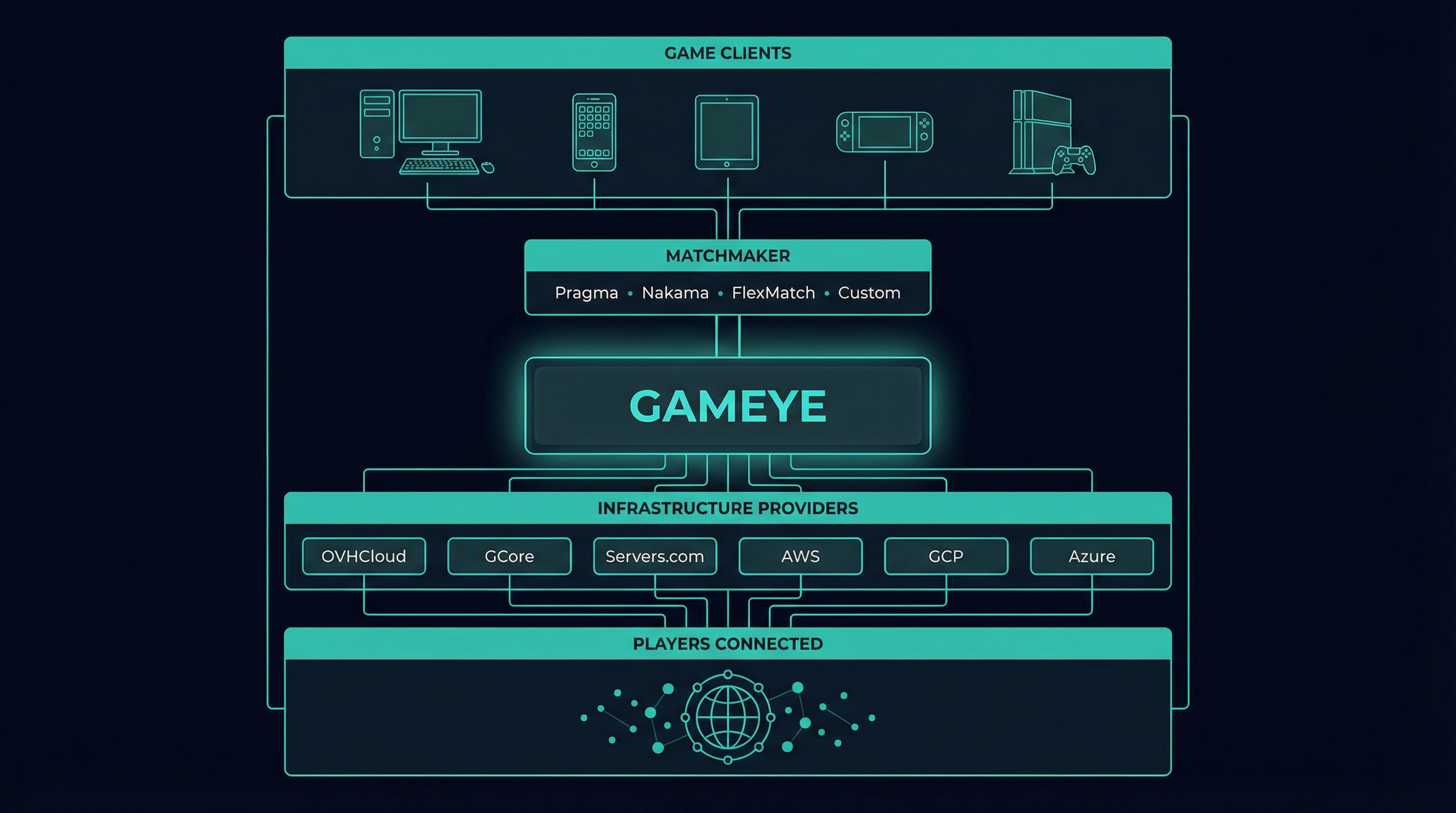
Gameye is the middle layer. Everything above it (your matchmaker, your game logic) and below it (the hardware, the network) stays the same. You're adding an orchestration layer, not replacing your stack.
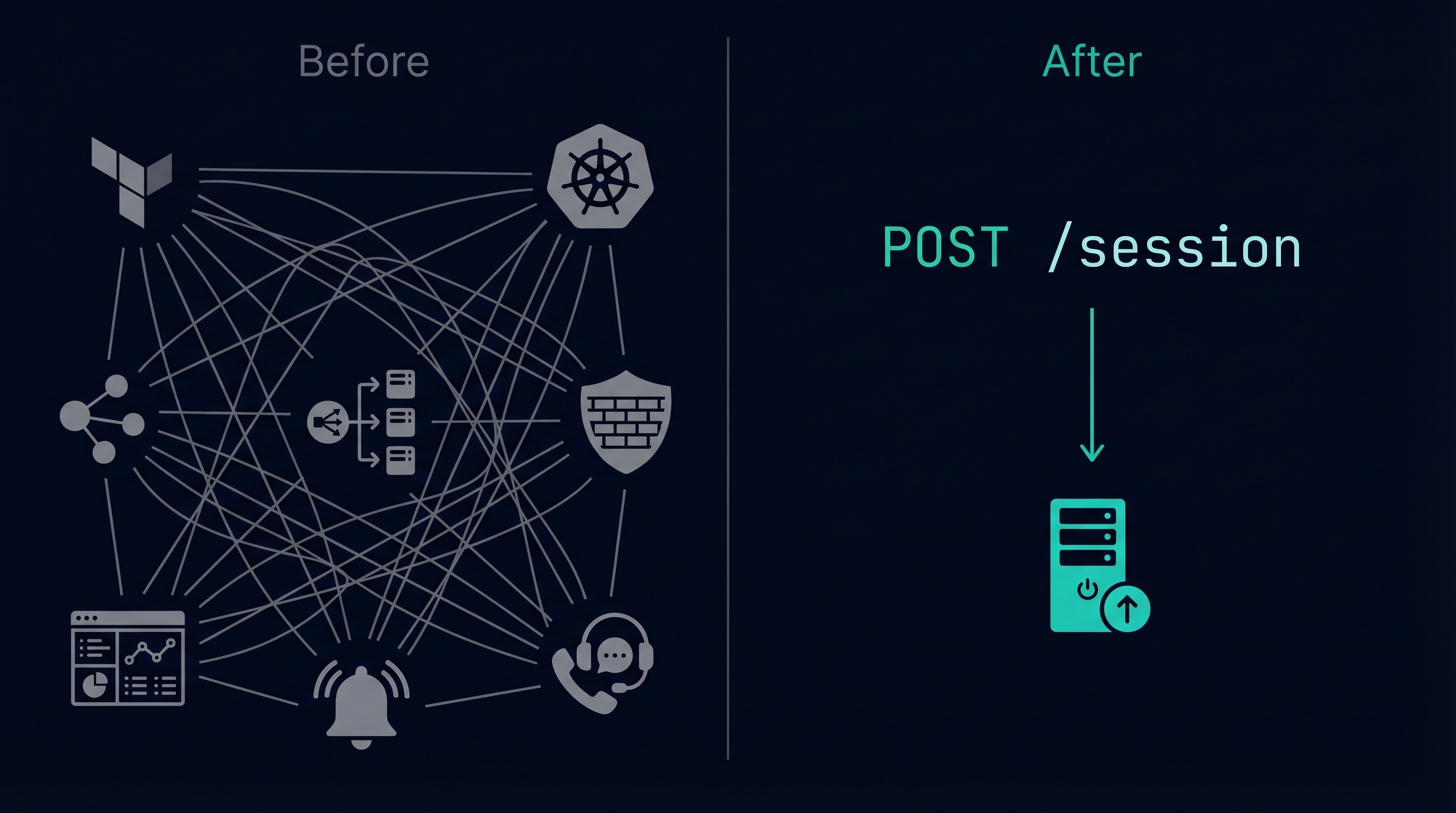
What does Gameye replace?
The infrastructure work your team would otherwise own:
Gameye replaces all of this with one API call: POST /session.
What doesn't Gameye touch?
Gameye stays in its lane. Your game code is yours.
How does it work?
Containerise your game server
Build a Linux dedicated server. Wrap it in a Dockerfile. Push to Docker Hub. Any engine works.
Configure in the Admin Panel
Set your image name, ports, networking mode, and deployment regions. Test-launch a container to verify.
Call the API
Your matchmaker calls POST /session with a region and your image name. Gameye returns the host IP and port in 0.5 seconds.
Players connect
Match starts. Gameye handles scaling, failover, DDoS protection, and teardown. You handle gameplay.
Who uses Gameye?
Chivalry 2 by Torn Banner Studios. Zero downtime. Gameye scaled automatically.
Clone Drone in the Danger Zone by Doborog Games. Switched to Gameye, eliminated egress fees.
Orion Drift by Another Axiom. Runs long-session games on Gameye using the reserved rate.
Gameye by the numbers
Frequently asked questions
Do I need a Gameye SDK in my game server?
No. Gameye requires no SDK, plugin, or code changes in your game server binary. Your server runs as a Docker container — it starts, listens on a port, and accepts connections. Gameye manages everything externally via its REST API.
What game engines does Gameye support?
Gameye is engine-agnostic. Any server that compiles to Linux and fits in a Docker container works: Unreal Engine, Unity, Godot, Mirror, Photon Fusion, custom C++, Rust, Go. Full engine support list.
How much does Gameye cost?
$0.07/vCPU/hr on demand, $0.02/vCPU/hr reserved. No egress fees. Billing is per second with no minimum session length. Full pricing.
Which matchmakers work with Gameye?
Gameye is matchmaker-agnostic. Native integrations exist for Pragma Engine, Nakama, FlexMatch, PlayFab, and Photon Fusion. Any backend that can make an HTTP request also works. All integrations.
How is Gameye different from AWS GameLift or Edgegap?
Gameye requires no SDK (GameLift and Agones-based platforms require one). Gameye includes egress (GameLift charges per-GB). Gameye runs across 21 providers (GameLift is AWS-only). Full comparisons.
Key terms
Go deeper
Get started
Try Gameye free.
120 minutes, no credit card.
Sign up with Google, push your Docker image, and run your first session — before your next standup.
Sign up free