

How does the infrastructure model work?
Most hosting platforms pick one approach: either cloud VMs (flexible but expensive and inconsistent) or bare metal (fast but rigid). Gameye uses both.
Bare metal
Dedicated physical servers with AMD Ryzen 7950X and EPYC CPUs running at 5 GHz+. No hypervisor, no noisy neighbours, no virtualisation overhead. This is where your daily player load runs.
- Consistent single-threaded performance for stable tick rates
- Reserved at $0.02/vCPU/hr — committed capacity at a lower rate
- 18 bare metal providers across EU, NA, APAC, LATAM, MEA
- Hardware qualified specifically for game workloads
Cloud scaling
When player demand exceeds your bare metal baseline, Gameye automatically provisions containers on cloud providers. No config changes, no API changes, no manual intervention.
- AWS, GCP, Azure, Akamai, Tencent Cloud
- On-demand at $0.07/vCPU/hr — pay only for the burst
- Automatic: Gameye decides when to spill into cloud
- Released when demand drops — no wasted capacity
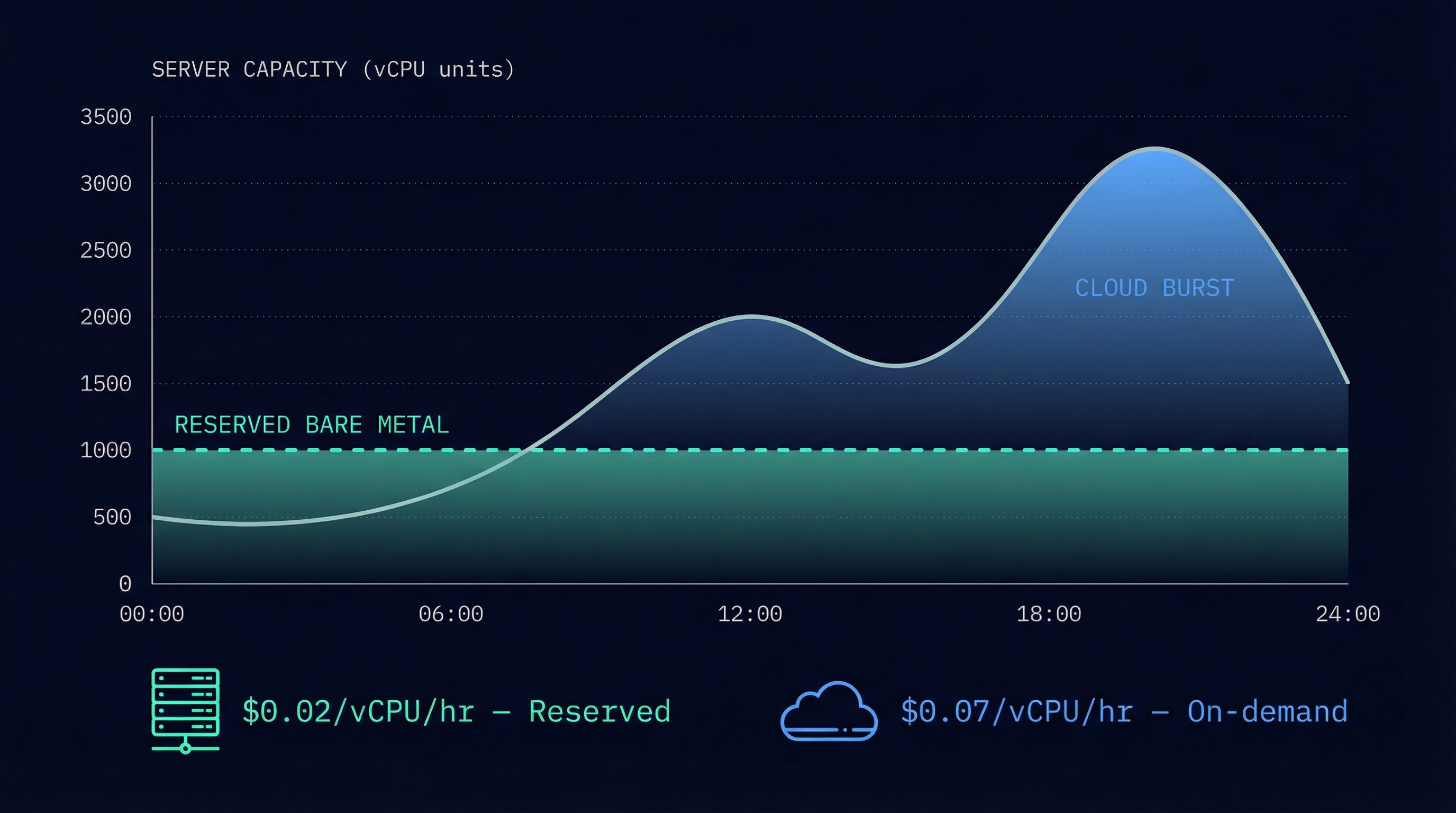
Reserve enough bare metal for your average daily load. Let cloud handle launches, free weekends, and seasonal spikes. You set the ratio — Gameye handles the execution.
Why does bare metal matter for game servers?
Game servers are uniquely demanding. They run physics simulations, hit detection, and state replication on a fixed tick rate — 30, 60, or 128 times per second. A single frame drop means rubberbanding, desyncs, or a failed hit registration that loses a player's trust.
Cloud VMs share physical hardware with other tenants. When a neighbour spikes CPU, your tick rate stutters. This is the "noisy neighbour" problem, and it's why competitive games overwhelmingly run on dedicated hardware.
| Bare metal | Cloud VM | |
|---|---|---|
| CPU consistency | Dedicated cores, no contention | Shared, variable under load |
| Clock speed | 5 GHz+ (Ryzen 7950X) | 3.5–4.1 GHz typical |
| Tick rate stability | Consistent at 128 Hz | Jitter under contention |
| Cost per vCPU-hour | $0.02 reserved | $0.07–$0.17 depending on provider |
| Egress | Included | $0.09–$0.12/GB on AWS, GCP, Azure |
| Noisy neighbours | None | Possible |
Bare metal is not always cheaper. It requires commitment. But for game servers that need consistent frame timing, it's the right baseline.
How does cloud bursting work?
Cloud bursting is automatic. When your reserved bare metal reaches its utilisation threshold, Gameye starts placing new sessions on cloud providers in the same region. When demand drops, cloud capacity is released.
Normal load
Sessions run on reserved bare metal. Consistent performance. Reserved rate ($0.02/vCPU/hr).
Threshold reached
Bare metal utilisation hits the configured threshold. Gameye begins placing new sessions on cloud providers automatically.
Burst active
New sessions land on AWS, GCP, Azure, Akamai, or Tencent Cloud at on-demand rates ($0.07/vCPU/hr). Existing bare metal sessions continue unaffected.
Demand drops
Cloud containers are released as sessions end. Load returns to bare metal. No manual intervention.
Your matchmaker doesn't change. Your API calls don't change. The session response still returns an IP and port in 0.5 seconds. The only difference is where the container runs — and Gameye handles that decision.
How does game server scaling work without Kubernetes?
Most game server scaling solutions are built on Kubernetes. Agones, GameLift FleetIQ, and most cloud-native approaches require you to manage node pools, configure Helm charts, set up horizontal pod autoscalers, and debug kubectl. That's a full-time infrastructure job.
Gameye replaces all of that with its orchestration layer. Scaling is a side effect of how sessions work:
Kubernetes-based scaling
- Configure node pools per region
- Write Helm charts for your game server
- Set up HPA or custom autoscaler
- Monitor node utilisation
- Handle pod scheduling and affinity rules
- Debug evictions during scale-down
- Manage kubectl access and RBAC
- On-call for cluster issues
Gameye scaling
- Call
POST /session
That's the entire scaling interface. Gameye handles placement, capacity, bursting, and teardown.
When your matchmaker needs a server, it calls the API. Gameye picks the best node with available capacity. If bare metal is full, it bursts to cloud. If demand drops, cloud capacity is released. Session ends, container is reclaimed. No manual scaling. No autoscaler tuning. No capacity planning dashboards.
This model scaled Chivalry 2 to 250,000 concurrent players on launch day with zero downtime. The studio's matchmaker called POST /session. Gameye handled everything else.
What are warm pools?
Warm pools are pre-started containers held in reserve. Instead of cold-starting a container when a session request arrives, Gameye assigns one that's already running.
You configure a pool size per application per region in the Admin Panel. Gameye keeps that many containers running and ready. When a session is requested, one is assigned instantly. The pool is replenished automatically.
Competitive games where sub-second allocation matters. High-frequency matchmaking where cold start time (already 0.5s) needs to be even lower. Any scenario where perceived speed affects player experience.
Every container in the warm pool is billable while it's held — whether or not it's been assigned to a session. You're paying for reserved readiness. Size your pool to match your expected concurrent demand, not your peak.
Which providers does Gameye use?
21 providers across 200+ datacenters on 6 continents. No single provider failure can take down a region.
Bare metal providers (18)
Dedicated hardware. Reserved capacity. Game-qualified CPUs. These run your daily baseline.
Cloud burst targets (5)
On-demand virtual machines. Burst capacity for peaks. Available in every region.
How is DDoS protection handled?
Every Gameye location includes game-aware DDoS protection. This is not a bolt-on or an add-on tier. It's built into the infrastructure.
How does multi-provider failover work?
Most hosting platforms run on a single cloud provider. If that provider has an outage, your game goes down.
Gameye maintains multiple providers per region. If a provider experiences issues, new sessions are automatically routed to healthy providers in the same region. Existing sessions on healthy nodes continue uninterrupted.
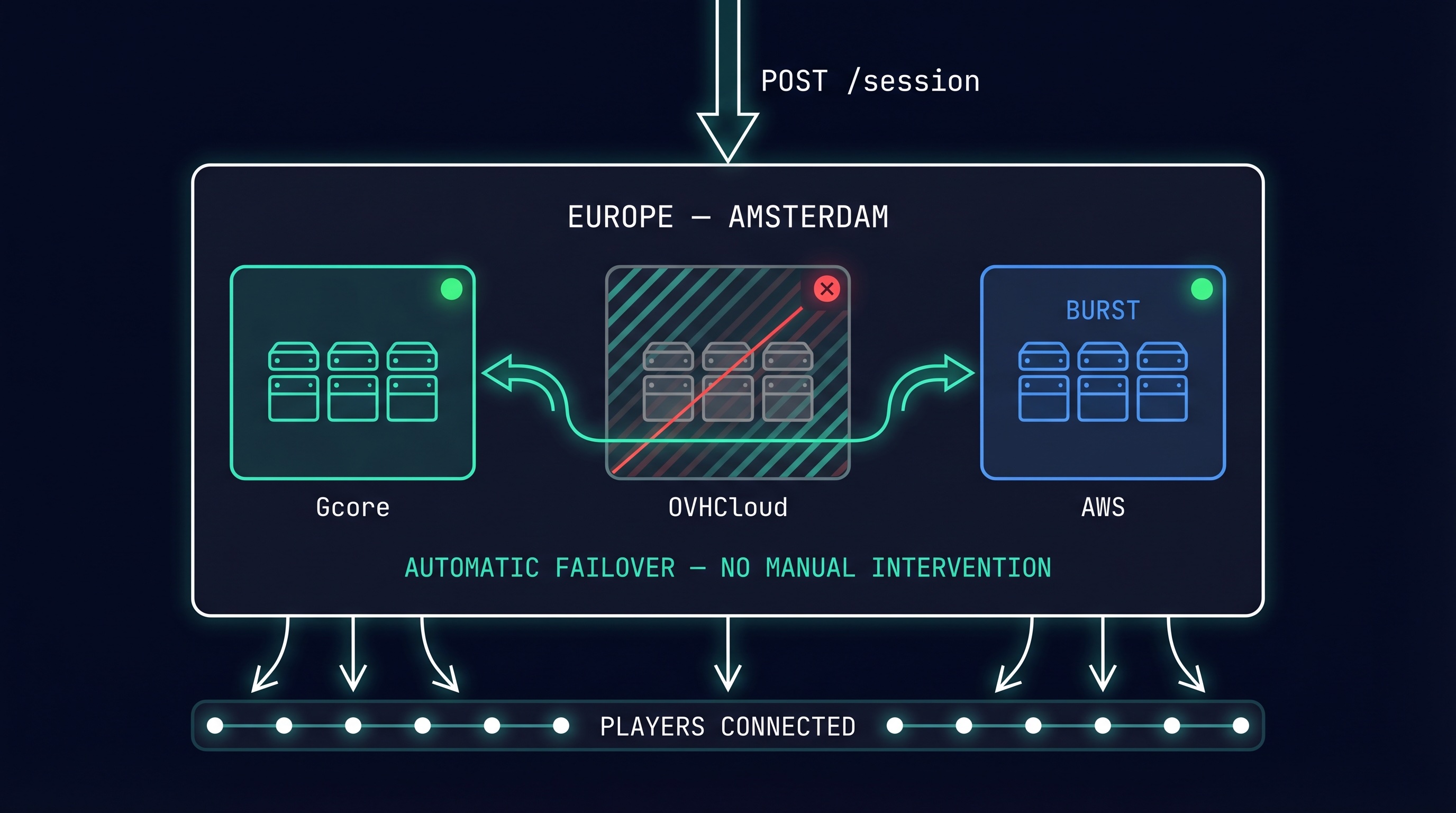
This is automatic. No manual intervention. No runbook. No pager. The same API call works whether the primary provider is healthy or not.
Where are the datacenters?
Amsterdam, Frankfurt, London, Paris, Warsaw, Stockholm, Madrid, Milan, Helsinki
New York, Ashburn, Chicago, Dallas, Los Angeles, Seattle, Toronto, Miami
Tokyo, Singapore, Sydney, Seoul, Mumbai, Hong Kong
São Paulo, Santiago, Buenos Aires
Dubai, Johannesburg
Exact location availability depends on your contract and provider mix. Full platform data and methodology.
Key terms
Frequently asked questions
What is bare metal baseline in game server hosting?
Bare metal baseline is dedicated physical hardware reserved for your game servers. Unlike cloud VMs, there's no hypervisor, no noisy neighbours, and no virtualisation overhead. Gameye's bare metal runs AMD Ryzen 7950X and EPYC CPUs at 5 GHz+, giving game servers consistent single-threaded performance for stable tick rates.
How does cloud bursting work for game servers?
When player demand exceeds your reserved bare metal capacity, Gameye automatically provisions containers on cloud providers (AWS, GCP, Azure, Akamai, Tencent Cloud). No config changes, no API changes, no manual intervention. When demand drops, cloud capacity is released. You pay on-demand rates only for the burst.
What is the difference between reserved and on-demand pricing?
Reserved capacity ($0.02/vCPU/hr) is a committed block of bare metal that's always available. On-demand ($0.07/vCPU/hr) is pay-as-you-go capacity for bursts above your baseline. Most studios reserve enough for their average daily load and use on-demand for peaks, launches, and free weekends. Full pricing.
What happens if a provider goes down?
Gameye routes new sessions to healthy providers in the same region automatically. No single provider failure can take down a Gameye region. Existing sessions on healthy nodes continue uninterrupted.
Do warm pool containers cost money when idle?
Yes. Every container in the warm pool is billable while it's held, whether or not it has been assigned to a session. You're paying for reserved readiness. Size your pool to match expected demand, not peak.
How does game server scaling work without Kubernetes?
Gameye handles game server scaling through its orchestration layer. When your matchmaker calls POST /session, Gameye places the container on the best available node. When demand exceeds reserved bare metal, it automatically bursts into cloud. When demand drops, cloud capacity is released. No kubectl, no Helm charts, no node pools. One API call scales from 1 to 100,000 sessions.
How do I scale game servers for a launch day spike?
Reserve bare metal for your expected baseline load. Gameye automatically bursts into cloud (AWS, GCP, Azure, Akamai, Tencent Cloud) when demand exceeds the baseline. No pre-provisioning, no autoscaling rules, no dashboards to watch. Chivalry 2 scaled to 250,000 concurrent players on launch day with zero downtime using this model.
Can I bring my own infrastructure?
Yes. BYOI (Bring Your Own Infrastructure) lets you run Gameye's orchestration engine on your own bare metal, colocation, or cloud accounts at $2/vCPU/month flat. You own the compute; Gameye provides the orchestration layer. BYOI details.
Go deeper
Get started
Try Gameye free.
120 minutes, no credit card.
Run your first session on bare metal. See the 0.5-second start time for yourself.
Sign up free